 LectorApp
The statistics it shows
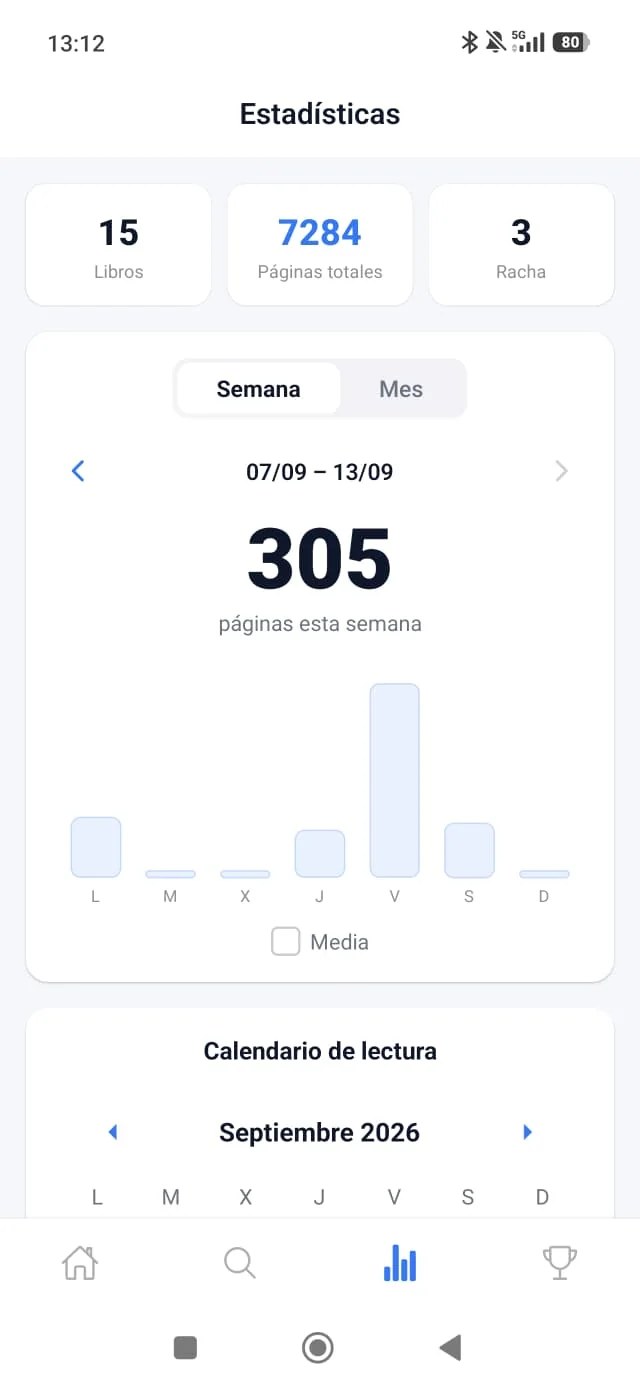
- Totals: books finished, total pages read and current streak.
- Weekly and monthly view: pages read each day in a chart, with the total for the period.
- Reading calendar: the days you read are marked in green.
- Monthly recap: this month's numbers against the last, ready to share (see the monthly recap).
- Stacked pages: your total pages turned into a tower (see stacked pages).
How many pages did I read this month?
Open the monthly view: LectorApp adds up the pages you logged each day and gives you the month's total, plus the day-by-day chart. If you want to compare it with last month, the monthly recap does it for you.
Where the data comes from
It all starts with logging your reading: when you update the page you're on, LectorApp works out the pages added and adds them to your day. There's nothing else to note.
Statistics only help if you keep reading: combine them with a daily goal and your streak.
Statistics built to keep you reading
- They motivate, they don't overwhelm: pages per day, a calendar in green, a shareable recap and stacked pages.
- How many pages you read this month, at a glance, and compared with last month.
- And you compete with them: very soon your pages will count in Rankings, between friends and between countries.
A good reading statistics app isn't the one with the most data, but the one that makes you want to open the book tomorrow.
Availability
- LectorApp is Android only and in closed testing on Google Play: you can request tester access.
- The iPhone version is in development.
- This feature is free and there are no ads.
Frequently asked questions
How do I know how many pages I read this month?
Open the monthly statistics view: it shows the pages for each day and the month's total.
Can I see my statistics by week?
Yes. There's a weekly and a monthly view, with the pages read each day.
Does it also count the books I finish?
Yes. Finished books appear in your totals and in the monthly recap.
Can I share my statistics?
Yes. The monthly recap is shared with one tap.